What makes a URL SEO-friendly?
An SEO-friendly URL is a readable, descriptive address that accurately represents its page. Google recommends simple URL structures, recognisable words instead of unnecessarily long identifiers that doesn’t makes sense to a human. Basically, the aim is clarity, not squeezing every possible search phrase into the address. Keep it natural, and you’ll be fine.
Compare these example URLs:
- Unclear:
https://example.com/index.php?id=84&ref=category9 - Descriptive:
https://example.com/guides/indoor-herb-garden
The second tells a prospective reader what to expect without requiring a visit. Use that as an editorial test: if someone saw only the address, could they reasonably identify the subject?
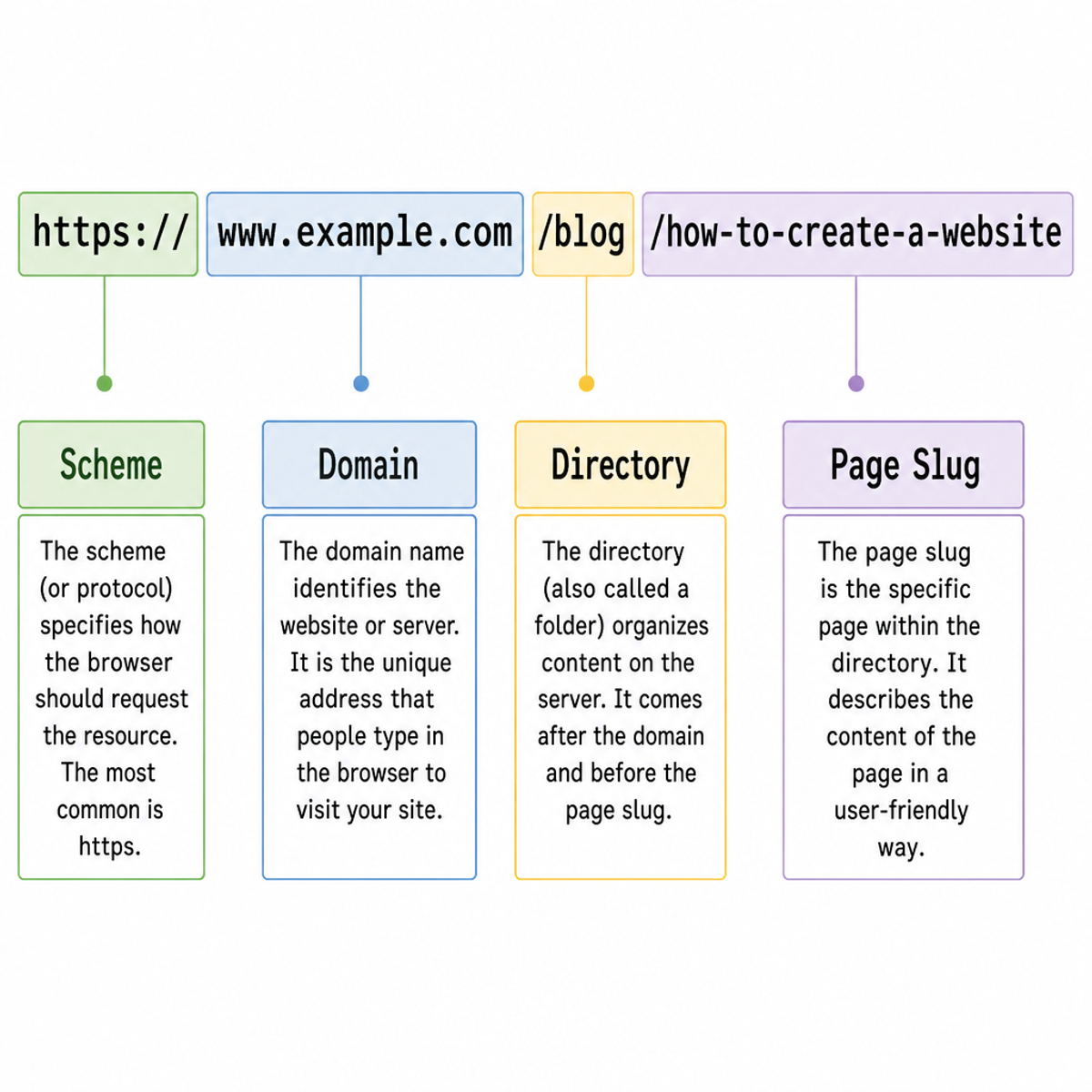
Have a look at this URL diagram, this is how it should look like.
Keep formatting predictable
Use hyphens between words rather than underscores or joined strings. Google specifically recommends hyphens because they help people and search engines identify word boundaries.
For a new page, choose /email-marketing-basics/ instead of /Email_Marketing_Basics.
How should you organize URL paths?
Organise URLs into clear, useful sections. Google recommends grouping related content logically, but your site structure should fit the content you publish.
So, for example, an educational article might live at /blog/indoor-herb-garden, while a service page could use /services/window-cleaning.
A product category might be /garden-tools, with an individual item at /products/compact-pruning-shears. Each path gives visitors and search engines a clear idea of what the page contains.
Treat these as examples, not required formats. Choose groups that will still make sense as your site grows. Avoid temporary labels such as /spring-promotion/ in permanent product URLs, and only include a category in a URL when it provides useful, lasting context.
Before settling on a structure, try it with the kinds of pages you expect to publish, such as articles, products, or services.
Handle URL parameters and duplicate pages with care
Parameters aren’t automatically bad for SEO. Problems can come up when they create lots of URLs showing the same content, or endless combinations of filters that search engines could keep crawling.
For example, /shoes/?sort=price and /shoes/?sort=popular might show the same products in a different order. Decide whether those versions need to appear in search results. Usually, you don’t need a separate search page for every sorting or filter option.
If you have duplicate or very similar pages, use a canonical URL to point to the version you want search engines to treat as the main one. Keep your internal links and sitemap consistent with that choice. Only group pages under the same canonical when their content is genuinely the same or very similar.
A URL fragment, such as #ingredients, points to a section on a page. It doesn’t create a separate page for search engines to index.
Should you change existing URLs for SEO?
Change a URL when there’s a good reason, like reorganising your site or fixing an address that no longer describes the page. Try not to change URLs just to make them look a little neater. A URL change needs a redirect and updates to your internal links and sitemap, and rankings can fluctuate for a while afterward.
When possible, use better URL conventions for new pages and leave established ones alone. If you do need to change a URL, make a list of what each change will fix.
If you change a URL
- Redirect the old address to the most relevant new page.
- Use a permanent server-side redirect, such as a 301 or 308.
- Update internal links and canonical tags to point directly to the new URL.
- Update your sitemap so it lists the new address, not the old one.
- Test the redirects and keep an eye on indexing and traffic after launch.
Avoid sending every old URL to your homepage. If there’s no relevant replacement for a page, choose what to do with it based on whether it still has useful content or links.
Make URL checks part of publishing
Before publishing, read the URL on its own and ask: does it describe the page, follow the site’s URL conventions, and avoid replacing an existing address unnecessarily?
Clear URLs help readers understand where they’re going. Make changes when they solve a real problem, and handle redirects and updates carefully.
And that’t it! That should cover the basics of seo for URLs.
Adam