
Technical SEO helps search engines find and understand your website. It can also make your site easier for visitors to use. Common tasks include fixing pages that can’t be indexed, improving mobile usability, cleaning up duplicate URLs, and adding accurate structured data.
These changes can help your site appear in search, but they don’t guarantee that a page will be indexed or rank higher. This guide covers common website problems, how to check for them, and how to decide what to fix first.
What does technical SEO include?
Technical SEO focuses on how search engines access, crawl, and understand your website. That might mean checking your robots.txt file, fixing canonical tags, submitting an XML sitemap, improving page speed, or making sure your navigation links work.
It’s useful to think of search as a few steps: search engines discover pages, crawl them, decide whether to index them, and then show relevant pages in results. If a valuable page is blocked or hard to understand, improving its headline alone won’t solve the problem.
SEO also includes the content on your pages and the recognition your site earns elsewhere. Those areas overlap with technical work. For example, internal links give readers useful context and help search engines find more of your pages.
Practical technical SEO improvements
1. Check for crawling and indexing problems
If an important page suddenly disappears from search, start with the basics. Does the page load successfully? Can search engines crawl it? Does it have an unintended noindex instruction?
The distinction between robots.txt and noindex matters. robots.txt can stop search engines from crawling a page, while noindex tells them not to include it in search results. If a page is blocked from crawling, a search engine may not be able to see its noindex instruction.
2. Make important pages easy to find
A product or service page should be reachable through your site’s navigation and relevant categories—not only through a search box. Clear links help visitors find what they need and give search engines a path through your content.
An XML sitemap can also help search engines discover pages. Keep it focused on the URLs you want search engines to consider, and make sure those URLs match your preferred versions. A sitemap helps with discovery, but it doesn’t guarantee indexing.
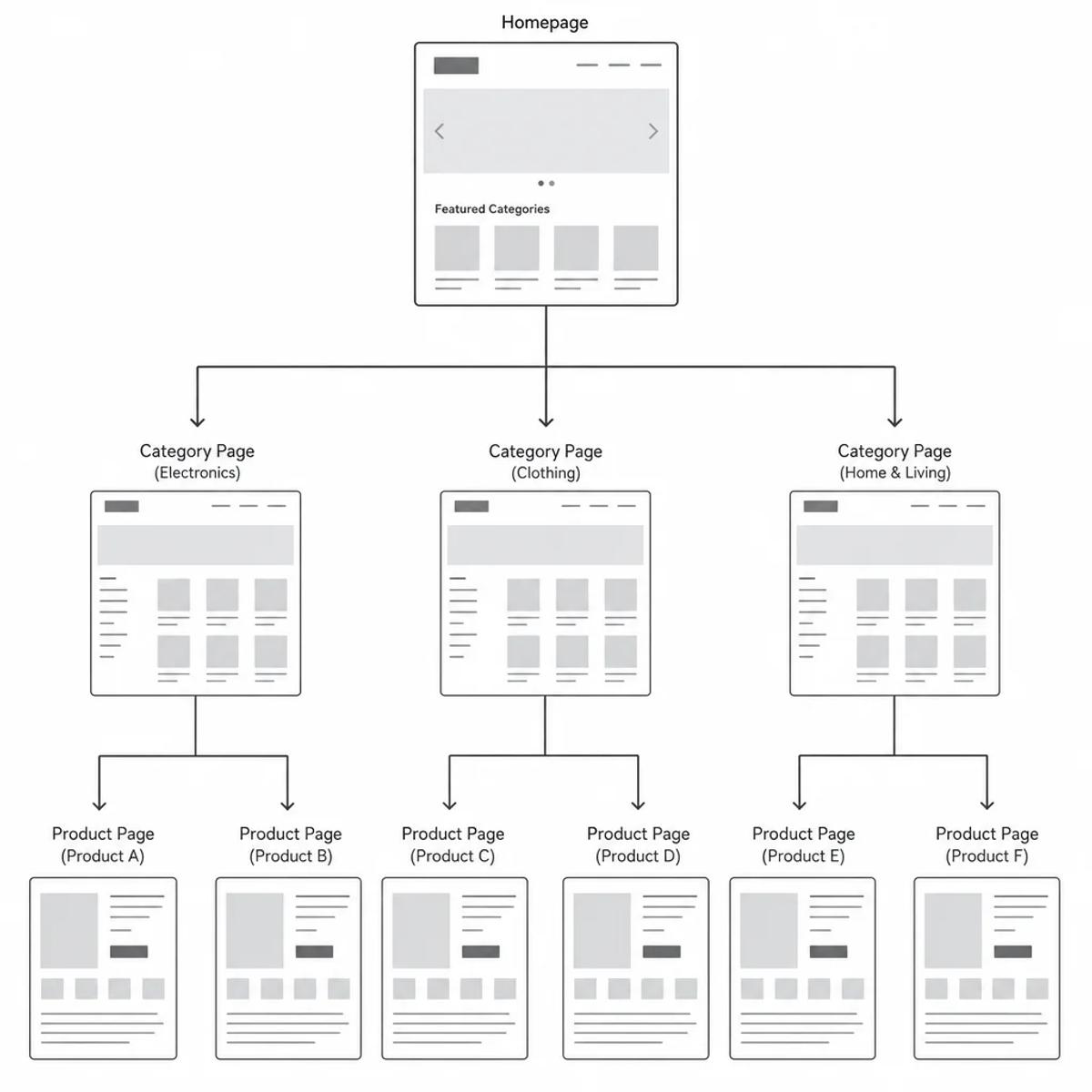
3. Tidy up duplicate URLs
Sometimes the same page is available at more than one URL, such as a clean product URL and a version with tracking parameters. A canonical tag can point search engines to the version you prefer.
Keep your canonical tags, sitemap, and other URL signals consistent. For online stores, review filtered category pages individually: some filter combinations may be useful search landing pages, while others may create unnecessary duplicates.
4. Fix broken links and redirects
When a page moves permanently, redirect its old URL to the most relevant replacement. During a redesign, map old pages to their new equivalents instead of sending every old URL to the homepage.
Also check for links on your own site that lead to missing pages or pass through unnecessary redirects. Where possible, update them to point straight to the final destination.
5. Improve loading speed and page stability
Core Web Vitals measure three parts of the user experience: how quickly the main content loads, how quickly the page responds to interactions, and whether the layout shifts unexpectedly.
A few practical places to start:
- Make sure the main image loads promptly. Avoid lazy-loading it if it’s the largest visible element on the page.
- Remove or reduce JavaScript that slows down the page or delays interactions.
- Set image and ad dimensions so content doesn’t jump around as the page loads.
- Lazy-load suitable images and embeds that are further down the page.
Use performance diagnostics to find issues, then check whether real visitors’ experience improves. Lab tests help troubleshoot; real-user data shows how your site performs for visitors when enough data is available.
6. Make sure the mobile experience is complete
Search engines use the mobile version of a site’s content for indexing and ranking. If a redesign hides useful text or changes indexing settings on mobile, the desktop version may not tell the whole story.
Check important pages on a phone. Try a realistic task, like finding a service, comparing products, or submitting an inquiry. Look for clipped text, awkward navigation, pop-ups that block the page, and forms that are hard to complete.
7. Check structured data and page content
Structured data describes what a page is about in a format search engines can read. It can make a page eligible for enhanced search results, but it doesn’t guarantee they’ll appear.
Use markup that matches the content visitors can actually see. If your site relies heavily on JavaScript, also check that important text and links are present in the rendered page—not only after a visitor clicks or interacts with something.
How to audit technical SEO and choose what to fix
Start with pages that matter to your business: your homepage, a key service or category page, a product or article, and any pages you’ve recently changed.
Then:
- Check which pages search engines have indexed, and investigate important URLs that appear excluded.
- Crawl your site to find broken pages, redirects, indexing instructions, canonical tags, internal links, and sitemap issues.
- Check performance and structured data on a few representative page types.
- Turn each confirmed issue into a task. Note the affected pages, what you found, why it matters, who will fix it, and how you’ll check the result.
Prioritize issues by impact. An accidental noindex across the whole site is usually more urgent than a small layout shift on one low-priority article. Next, look at issues affecting important page templates or customer journeys. Avoid changing URLs for cosmetic reasons unless there’s a clear benefit to justify the migration work.
For hands-on fixes, start with reports and settings you understand. Ask a developer to review changes to server redirects, page rendering, or broad crawling and canonical rules. Before changing URL behavior, map the intended destinations and test the redirects.
How to measure the results
For each change, decide what you expect to improve and how you’ll check it. For example, after removing an unintended noindex, check whether the affected pages become indexed. After fixing duplicate URLs, check whether search engines are recognising your preferred versions.
You can also track:
- Page speed improvements: Review diagnostic results and real-user performance trends.
- Navigation fixes: Recrawl the affected links, then monitor visits and inquiries on the destination pages.
- Search visibility: Watch clicks, impressions, click-through rate, and average position alongside technical checks.
Note the date each change goes live and compare similar periods. Where useful, break results down by page group or device. Keep in mind that content updates, promotions, and seasonal demand can affect the numbers too, so a change in traffic doesn’t automatically prove that one technical fix caused it.
Build a solid foundation first
Pick an important group of pages, find the biggest confirmed problem, and fix that before adding more tasks to your list. A simple cycle works well: inspect, prioritize, fix, and check the result.
The same approach applies to AI-powered search features. Focus on useful content and a site that search engines can access and understand; there’s no special markup that guarantees your pages will be included.